Side by side.
Descript details are from its own site, read on 4 October 2026. Plans change; check descript.com before you decide.
What comes out.
Each of these came out of a longer video, already cut, titled and captioned.

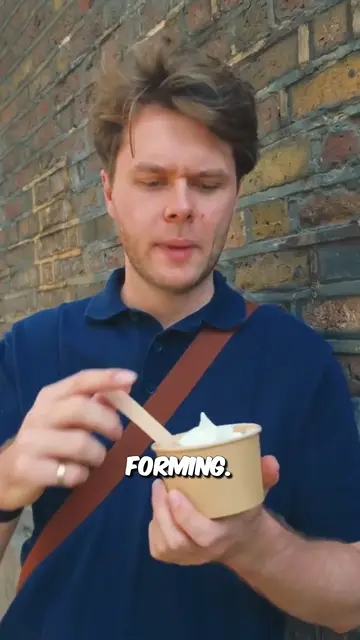

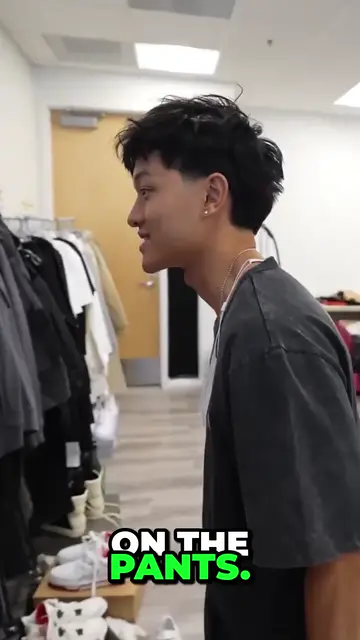
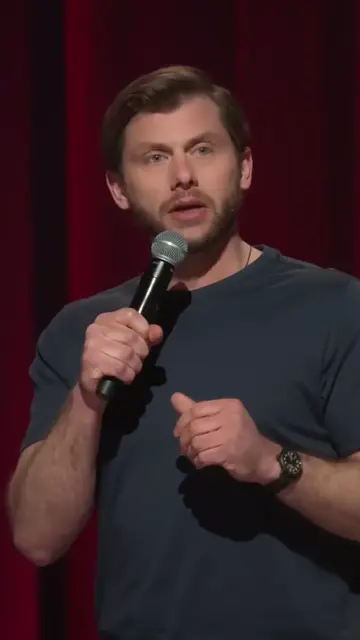

Real outputs from the beta. The creators shown are not affiliated with Mossclip.
Free during the closed beta. Sign in, join the Discord, press one button and you’re in.
Get clipsAn editor and a clip maker are different jobs
Descript is where an episode gets made: you edit the transcript, cut the filler and clean up the audio in one place. Its Create Clips tool finds moments and hands each one back as a composition that can be edited.
Mossclip is only the last step. You already have the episode, and you want the clips found, framed and captioned without opening an editor first.
The whole episode in one job
Give Mossclip the full recording, up to two hours. It reads all of it, so the clip can come from minute 71 as easily as minute 3, and it keeps the question with its answer instead of cutting on a timer. In one recorded job a 59-minute interview gave 36 candidate moments, and the best 9 were kept.
Descript counts media by the month: 1 media hour on the free plan and 10 on Hobbyist.
Clips that arrive finished
Each clip comes back vertical at 1080 by 1920, between 15 seconds and 3 minutes long, with a title and every word captioned in one of nine styles. A podcast, an interview or a vlog gets a crop that follows the person speaking.
Still an edit by words
In Descript, deleting a word deletes that moment of video. The same idea is here. Each clip opens with its transcript beside the video. Delete words and the clip loses exactly those seconds. Restyle the captions, or retype a word the transcription got wrong.
Why people pick Mossclip over Descript
- Clips found, framed and captioned in one job.
- Up to two hours of recording per job.
- Full 1080 by 1920 exports while it is free.
- Cut a clip by deleting its words.
Questions.
Is Mossclip a Descript alternative?
For one job, yes: turning a finished recording into captioned vertical clips. Descript is a full video and audio editor. Mossclip finds the clips, frames them and captions them for you.
How long can the episode be?
Up to two hours of recording per job. For a longer recording you pick the part to clip.
How many clips do I get from an episode?
It depends on the episode. In one recorded job, a 59-minute interview gave 36 candidate moments, of which Mossclip kept the best 9.
Can I edit by text?
Yes. Delete words from the transcript and the video loses exactly those seconds. Captions come in nine styles and any word can be retyped.
What do I need to start?
Paste a YouTube, Twitch or Kick link, or upload a recording as an MP4 or MOV.
Is Mossclip free?
Mossclip is free during its closed beta. Join the Discord server, press one button, and your account is open.
Sources, read on 4 October 2026: Descript, Descript pricing, Descript Create Clips, Descript help: Create Clips, Descript help: Center active speaker.
Your next clip
is already
recorded.
Free during the closed beta. Sign in, join the Discord, press one button and you’re in.